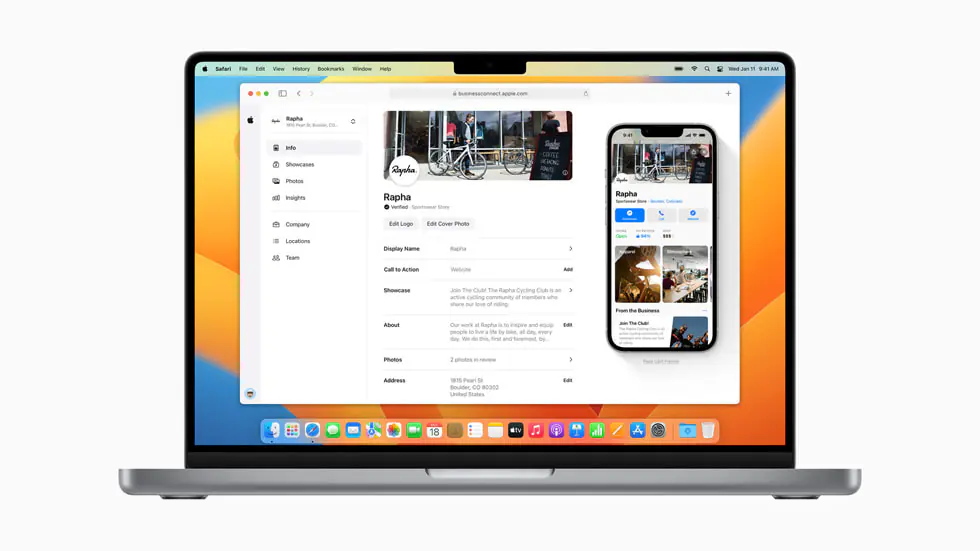
As a business owner, reaching your customers where they are is essential, and Apple Business Connect offers a streamlined way to do just that. Whether you’re running a local shop, restaurant, or any service-oriented business, Apple Business Connect lets you showcase your business information on Apple platforms, making it easy for iPhone users and Apple device owners to discover you.
This guide will take you through every step of setting up your profile so your business can reach its full potential on Apple Maps and other Apple services.
In addition, we’ll explore the benefits of Apple Business Connect to help you make the most of this valuable tool.
What is Apple Business Connect?
Apple Business Connect is a free tool that allows businesses to manage and optimize their presence on Apple’s ecosystem, including Apple Maps, Siri, Spotlight Search, and more. Apple has created a comprehensive platform for businesses to update their listings, provide accurate information, and engage with potential customers directly from Apple devices.
For small businesses, local stores, or global brands, Apple Business Connect provides visibility to millions of Apple device users who rely on Apple services for navigation, local search, and recommendations. Setting up your business profile ensures that your information is accurate and consistent across Apple’s digital environment.
By leveraging Apple’s powerful ecosystem, you can easily manage your contact details, hours of operation, and other essential business information that customers rely on when making decisions about where to shop, dine, or use services.
Step-by-Step Process to Set Up Apple Business Connect
Now that we’ve covered what Apple Business Connect is and why it’s beneficial, let’s dive into the step-by-step process of setting up your business profile.
Step 1: Go to Apple Business Connect
To get started, head to the Apple Business Connect website at businessconnect.apple.com. Before beginning, make sure you have all the necessary business details ready, including your company name, address, phone number, website URL, and other relevant information. This will ensure a smooth registration process.
Step 2: Log In or Create an Apple Account
If you already have an Apple ID, you can log in with your credentials. If you don’t have one yet, creating an Apple ID is quick and easy. Follow the on-screen instructions to set up an account. Once you’re logged in, click on the Get Started button to begin the registration process.
Step 3: Enter Your Business Information
Carefully fill in the required business details, including:
- Company Name
- Address
- Phone Number
- Website URL
Once entered, click Check to ensure that your business information is accurate and properly formatted. Apple will automatically verify the information for consistency across its platform.
Step 4: Verify Your Business
Next, you’ll need to verify your business to ensure that you have the authority to manage the listing. Hover over your company listing, go to Access, and click Verify Now. Apple may request additional documents for verification, such as:
- TIN or Business Registration Number
- Company Incorporation Number
You can choose between DNS verification or document upload, depending on what is most convenient for your business.
Step 5: DNS Verification (Optional)
If you select DNS verification, Apple will provide a verification code. You will need to copy this code and paste it into your DNS Zone Editor. Many hosting platforms, like SiteGround, offer user-friendly support for DNS configuration, making this step simple and quick.
Step 6: Submit for Review
Once you’ve completed the setup and verification process, click Send for Review. Apple typically takes 5 business days to review your submission and approve your business listing. After approval, your business profile will be live and available to millions of Apple users across the globe.
Why Should You Set Up Apple Business Connect for Your Business?
Setting up your business on Apple Business Connect is one of the most effective ways to improve your visibility and customer engagement within Apple’s ecosystem. Here’s why you should consider using it:
Increased Local Visibility: Apple Maps, Siri, and Spotlight Search are essential tools for local search. Millions of users rely on these services to find businesses near them. When you set up your profile, your business becomes discoverable in these high-traffic areas.
Seamless Customer Interaction: Apple Business Connect allows users to contact you directly from your profile. They can call, text, or even get directions to your business location right from their Apple devices. This ease of access can lead to more foot traffic and higher customer conversion rates.
Real-Time Business Updates: One of the biggest advantages of Apple Business Connect is that you can update your business details in real-time. If your hours change, you can make the adjustment immediately. This ensures that customers always have the most up-to-date information.
Access to Insights: Apple Business Connect offers analytics that give you valuable insights into how customers are interacting with your listing. This data can help you tailor your marketing strategies and enhance customer engagement based on real-time behavior.
Cost-Free Tool: Unlike many other local listing services, Apple Business Connect is free to use. It provides business owners with an excellent opportunity to expand their digital presence without any upfront costs.
Key Takeaways
Boost Visibility: Enhance your business presence on Apple Maps, Siri, and Spotlight Search, reaching millions of Apple users.
Simple Setup: Follow an easy step-by-step registration and verification process to get started.
Customer Engagement: Allow customers to contact you, get directions, and interact with your profile seamlessly.
Real-Time Updates: Ensure customers have the latest information by updating your business details instantly.
Free Tool: Benefit from comprehensive business listing management at no cost.
SEO Advantage: Strengthen local search rankings and build credibility with customer reviews and accurate information.
Conclusion
Setting up your business on Apple Business Connect is a powerful way to reach a broader audience and improve your local search presence within the Apple ecosystem. The step-by-step guide outlined above will help you set up your profile and make your business more accessible to millions of Apple device users. The process is simple, cost-free, and provides immediate benefits for your business.
Ready to Expand Your Digital Footprint?
Get started with Apple Business Connect today and unlock a new channel for customer engagement.
If you’re interested in taking your digital presence further, explore our SEO Mastery courses at searchenginemastery.com for the latest in local and e-commerce SEO tactics.
Looking for an edge in SEO? Download our Premium SEO Checklist for the latest strategies that can transform your business.
Thank you for following along, and here’s to your success in the Apple ecosystem!