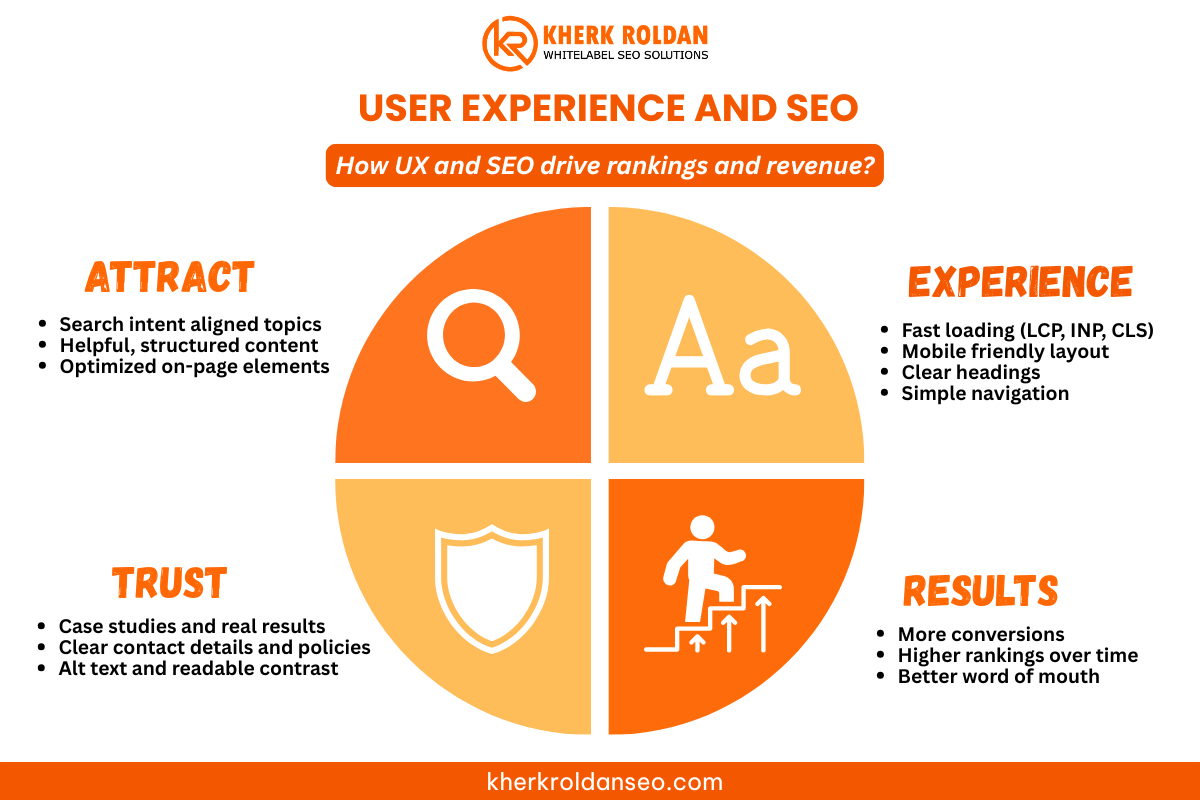
Good rankings are useless if people hate using your website.
This guide shows how user experience and SEO work together to help your site rank, keep visitors happy, and deliver tangible business results.
Why User Experience and SEO Belong Together
SEO brings the right people to your website.
User experience decides what they do once they arrive.
Google has confirmed that page experience and Core Web Vitals play a role in how pages rank within its wider ranking systems.
At the same time:
- Only around 33% of websites pass Google’s Core Web Vitals test.
- Studies show 74% of businesses say UX is vital for boosting sales, and bad UX can cost up to 35% of sales.
- A 1-second delay in mobile load time can cut conversions by up to 20%.
So if your site is slow or confusing, you lose on two sides:
- Search engines see weak signals.
- Visitors leave before they contact you or make a purchase.
When you treat UX and SEO as one strategy, you:
- Make it easier for people to find you.
- Make it easier for them to understand you.
- Make it easier for them to trust you and take the next step.
How User Experience Affects SEO in 2025
Core Web Vitals and Page Experience
Core Web Vitals are Google’s way of measuring real-world user experience. They focus on three main things:
- Largest Contentful Paint (LCP) – how fast the main content loads.
- Interaction to Next Paint (INP) – how quickly the page responds when someone taps or clicks.
- Cumulative Layout Shift (CLS) – how stable the layout is while loading.
When these metrics are poor, visitors feel it as:
- “This page is so slow.”
- “The button moved just as I tried to click.”
- “This website feels broken.”
Google uses these signals as part of its overall view of quality and page experience. A better experience leads to better engagement and, over time, better search results.
Mobile Experience and Site Speed
In the Philippines and worldwide, most browsing now happens on mobile devices.
If your site:
- Loads slowly on mobile
- Has tiny buttons
- Forces people to pinch and zoom
You create friction that hurts both UX and SEO.
Google’s ranking advice for 2025 still emphasizes mobile-friendliness and speed as core factors for visibility.
Content Structure, Readability, and Search Intent
Search engines want to send users to pages that clearly answer the question.
Strong UX supports that by:
- Using clear headings (H1, H2, H3) that match search intent
- Keeping paragraphs short and easy to scan
- Using bullet points and tables for complex ideas
- Adding internal links to related content so readers can go deeper
This structure helps Google understand your content and keeps visitors longer, often leading to stronger engagement signals.
Accessibility, Trust, and E-E-A-T
Accessibility is not only an ethical choice but also a good SEO practice.
Simple actions like:
- Using a clear contrast between text and background
- Adding alt text that describes images
- Making forms easy to use with keyboard and screen readers
can improve how both users and search engines read your site.
Alongside this, Google’s E-E-A-T guidance (Experience, Expertise, Authoritativeness, Trustworthiness) rewards sites that look credible, helpful, and safe.
Good UX supports E-E-A-T when you:
- Show real case studies and client results
- Display precise contact details and policies
- Use simple language instead of jargon
Balancing SEO and User Experience with AI Keyword Research: A Simple Framework
You do not have to choose between UX and SEO.
You only need to follow the correct order.
Step 1 – Map the Human Journey
Before thinking about keywords, ask:
- Who is arriving on this page?
- What problem are they trying to solve?
- What is the next step that makes sense for them?
For example, a local clinic in Manila might have this path:
- Search “skin clinic near me”.
- Land on a service page.
- Check reviews and before/after photos.
- Click a button to book an appointment or send a message.
Your UX design should make this journey feel smooth and natural.
Step 2 – Align Content and SEO with That Journey
Once you know the journey:
- Place your primary keyword in the title and first paragraph, in a natural way.
- Add related terms in subheadings where they actually fit.
- Answer the main question early, then add details below.
- Use internal links to connect to service pages, blog posts, and resources that help the user move forward.
Step 3 – Use Data to Guide Changes
Instead of guessing, look at:
- Google Analytics and Search Console
- Core Web Vitals reports
- Scroll maps, heatmaps, and session recordings
- Live feedback from actual customers
If you see high bounce rates or low time on page, ask:
“Is this a content issue, a design issue, or a speed issue?”
Then adjust the part causing the friction.
Simple Ways to Improve UX and SEO Together
Here are practical actions you can take right away.
1. Fix Navigation and Site Structure
Make sure:
- Your menu has clear labels (not clever names).
- Important pages are reachable within 2–3 clicks.
- Internal links create a logical path between related topics.
These links help both readers and search engines understand the bigger picture of your services.
2. Improve Above-the-Fold Experience
The first screen a visitor sees should answer:
- Where am I?
- What do you do?
- Who is this for?
- What should I do next?
Use:
- A clear headline with your primary keyword
- A short subheading that speaks to the visitor’s problem
- One main call-to-action (book a call, send a message, request a quote)
3. Make Content Easy to Read
For every page:
- Use short paragraphs (1–3 sentences).
- Add space between sections.
- Use bullet points for lists.
- Avoid heavy jargon if your audience is not technical.
This makes it easier for visitors and for AI-powered search experiences to “lift” key answers from your content.
4. Focus on Helpful, Real-World Content
Bring in real proof:
- Case studies showing rankings and traffic improvements
- Before/after screenshots of Search Console and analytics
- Stories of local businesses in the Philippines and abroad that grew after fixing UX and SEO together
Local Relevance: UX, SEO, and Philippine Businesses
For businesses in the Philippines, user experience and SEO are strongly tied to:
- Local search – Google Business Profiles, maps, and “near me” queries
- Mobile users – many people search and inquire using phones and messaging apps
- Trust signals – reviews, photos, and precise service details
A local brand that cares about UX will:
- Keep its contact info and map consistent across the site and Google Business Profile
- Make it easy to tap to call or send a message
- Show reviews and social proof near calls-to-action
For agencies and freelancers, strong UX makes it easier to white-label SEO work because clients see clean reports, clear layouts, and websites that are easy to use.
When to Bring in a UX + SEO Partner
You may need expert support if:
- Your rankings are fine, but conversions are weak.
- Your site is beautiful, but traffic is low.
- You know there are speed and UX issues, but you do not have a technical team.
- You handle several client sites and need a Philippine-based white-label partner.
Frequently Asked Questions
1. How does user experience affect SEO rankings?
User experience affects how people behave on your site. If your pages load fast, are easy to read, and answer questions clearly, people stay longer and engage more. By combining solid UX with insights from AI keyword research, you can ensure your content matches what users actually need. Google uses many signals linked to this behavior, along with Core Web Vitals and page experience checks to decide which pages deserve better visibility.
2. Is user experience a Google ranking factor?
User experience itself is not a single “button,” but Google uses several UX-related signals as part of its ranking systems, such as:
- Core Web Vitals
- Mobile-friendliness
- HTTPS
- Page experience metrics
So improving UX supports better ranking potential over time.
3. What is more important, SEO or user experience?
If you focus solely on SEO, you may attract traffic that doesn’t convert.
If you focus only on UX, you may end up with a great site that nobody finds.
The strongest approach is to treat UX and SEO as one strategy:
- SEO brings exemplary visitors.
- UX helps them trust you and take action.
4. How do you balance SEO and user experience on a website?
Use this order:
- Start with the visitor’s problem and journey.
- Design a layout that makes their next step easy.
- Add SEO elements (keywords, internal links, meta tags) naturally.
- Test with real users and review analytics data to adjust.
5. Do Core Web Vitals really matter for small businesses?
Yes. Even for small local businesses, page speed and stability matter.
Slow or jumpy pages push people away, especially on mobile, and Google has confirmed that Core Web Vitals contribute to ranking signals.
6. Can better UX increase my sales, not just my traffic?
Yes. Data shows that businesses with strong user experience see higher revenue, while poor UX can cost more than a third of potential sales.
Improving UX usually boosts both conversions and customer trust, which in turn drives better word of mouth and brand visibility.
Conclusion
User experience and SEO are not two separate projects. They are two angles of the same goal: helping real people solve real problems through your website. With innovative strategies powered by AI keyword research, you can better understand what your audience needs and create content that truly serves them.
When you fix Core Web Vitals and mobile issues, make your content clear and easy to read, respect your visitors’ time and attention, and back everything with real expertise and case studies, you create a website that search engines are happy to show, and people are happy to use.
If you want support bringing UX and SEO together for your business or your clients, you can book a free strategy session with Kherk Roldan Advanced Digital Solutions.