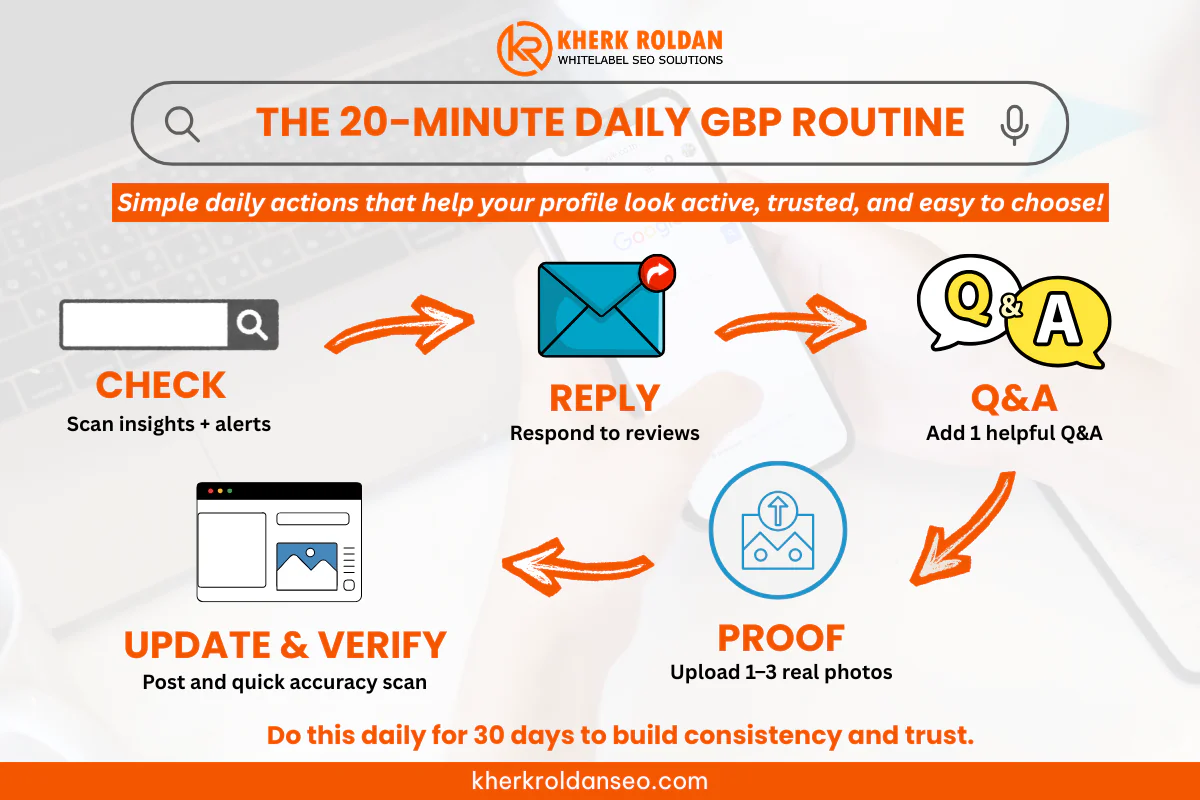
A Google Business Profile can bring calls even when the website is quiet. The difference is not luck. It is consistency. This guide shows a simple 20-minute routine you can do daily to keep your listing active, trusted, and easier to pick in Maps with GMB Optimization.
Why GMB optimization matters (especially for calls)
When someone searches “near me,” the decision often happens on the search results page. They check rating, photos, distance, and whether the business looks active.
Two trust signals matter a lot:
- Star rating: 71% of consumers would not consider a business with an average rating below 3 stars.
- Review freshness: In 2025 findings, some consumers look for reviews as recent as two weeks.
That means a profile that looks “alive” can win calls even if competitors have bigger websites.
What these services really include
A good set of gmb services is not only “fill out the profile.” It usually includes:
- Correct business category and services
- Clean NAP (name, address, phone) consistency across the web
- Strong photos and regular updates
- Review request system and fast responses
- Q&A monitoring (so random people do not answer for you)
- Basic tracking (calls, direction requests, website clicks)
This is why many local businesses choose a gmb optimizer when time is limited and consistency is hard to maintain.
The 20-minute daily routine (simple, repeatable)
This routine is built for busy owners. It aims for the highest-impact tasks that support trust and conversions.
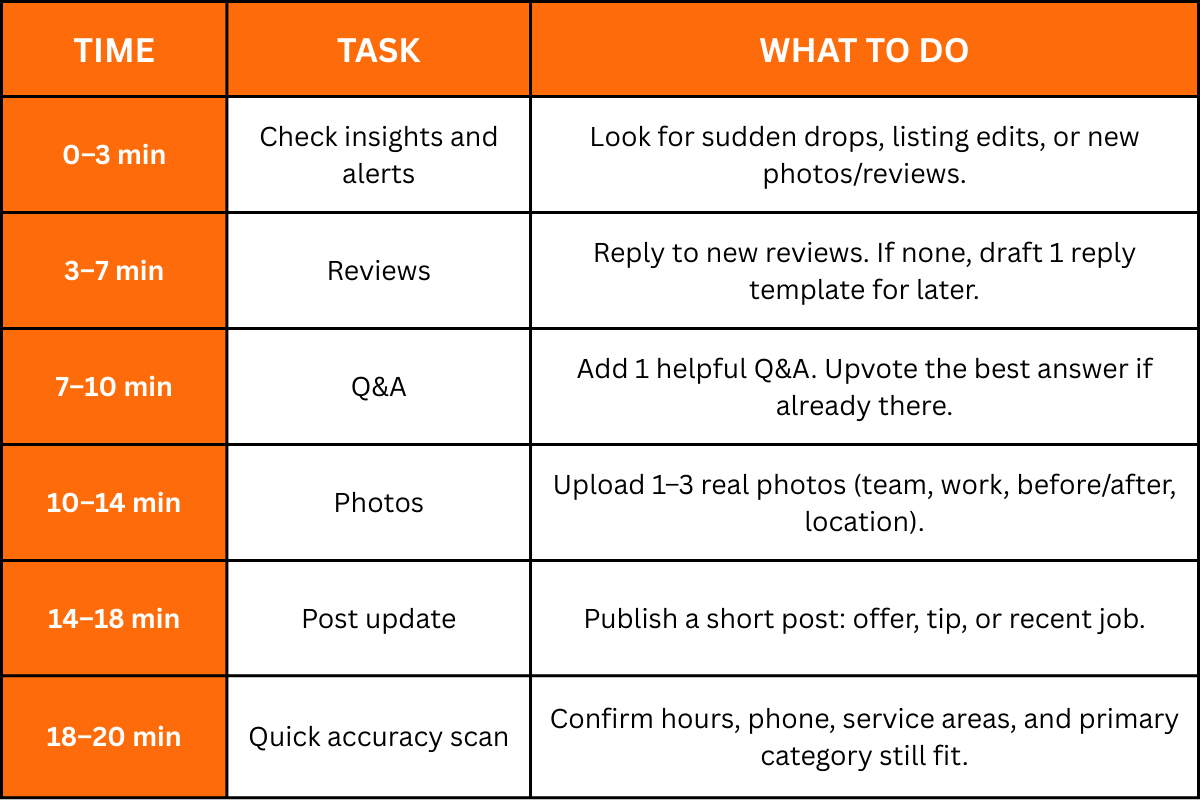
How to do each step (with examples)
This routine is built for busy owners. It aims for the highest-impact tasks that support trust and conversions.
1) Check insights and changes (3 minutes)
Open your profile and look for:
- “Profile strength” prompts
- Suggested edits by users
- Any warnings or policy notes
Why this matters: Google has increased enforcement around fake engagement and suspicious activity, including review-related actions.
Quick win: If “services” are empty or outdated, add 2 services today and 2 tomorrow until complete.
2) Review replies that lead to calls (4 minutes)
Replies are not only courtesy. They are a sales moment.
Use this reply pattern:
- Thank them
- Mention the service
- Mention the location or service area
- Invite them back
Example reply (short):
“Thanks, Mark. Happy the AC cleaning in Quezon City helped. If anything feels off again, call anytime and the team will assist.”
Also, keep review quality high. Many consumers still use reviews as a primary trust signal, and low ratings can remove you from consideration.
3) Control the Q&A section (3 minutes)
If Q&A is ignored, random people may answer with wrong info.
Add questions that remove booking friction:
- “Do walk-ins accept today?”
- “Do you offer same-day service?”
- “What areas do you serve?”
- “What payment methods are accepted?”
Tip: Use your real policies and real coverage. If you serve a service area business, state barangays or cities clearly.
4) Upload photos that prove the business is real (4 minutes)
Photos help people feel safe calling. They also help prove legitimacy, which matters more as Google pushes stronger verification and business proof steps like video verification for some profiles. Photo types that tend to help:
- Storefront or signage
- Team at work (real)
- Before and after results
- Equipment and work vehicles
- Menu, price list, or service process
Rule: Avoid stock images for core proof photos.
5) Post updates that match real buyer intent (4 minutes)
Posts are your “freshness signal” and your mini ad.
Use any of these post angles:
- Limited-time offer
- “What to expect” process post
- Recent job highlight
- Quick tip that shows expertise
- Seasonal service reminder
Post example (copy-ready):
“Same-day leak inspection available today. Serving Makati, Taguig, and Pasig. Call now for schedule options.”
Also keep in mind: local discovery is changing as Google rolls out more AI-driven experiences in search. Clear, helpful updates improve the chance of being chosen even when fewer clicks happen.
6) Accuracy scan (2 minutes)
This is boring, but it prevents lost calls.
Check:
- Hours (especially holidays)
- Phone number
- Website link
- Primary category
- Address pin location (if storefront)
- Service area (if SAB)
Messaging workflows also changed in recent years. Google removed chat and call history features in Business Profile, and Google Business Messages was discontinued in 2024, so do not rely on those as the main lead path. Calls and form fills should be the priority.
Weekly add-ons (optional, but high impact)
If 20 minutes daily is already locked in, add these once a week:
- Citation cleanup: fix NAP issues across directories
- Service list review: add missing services and write short descriptions
- Photo audit: remove low-quality images
- Competitor scan: check top 3 map competitors and note what they do better
This ties in well with supporting work like Google Maps citations, which helps consistency across the web.
Common mistakes that block calls
- Wrong primary category (you show for the wrong searches)
- No proof photos (profile looks inactive or not real)
- Slow review replies (trust drops)
- Weak service area clarity (customers assume you do not serve them)
- Inconsistent NAP across listings (confuses Google and customers)
FAQs
1) What is GMB optimization?
It is the ongoing work that keeps your Google Business Profile accurate, active, and trusted so it can earn more visibility and calls in local search.
2) How long does it take to see more calls?
Some profiles see movement in 2–4 weeks if the listing is incomplete or reviews were neglected. Competitive areas can take longer, especially if categories, citations, or authority signals are weak.
3) Do posts and photos really matter?
Yes, mainly for conversion. A profile with frequent real photos and updates looks safer and more active, which increases the chance someone taps “Call.”
4) How many reviews are needed to rank?
There is no fixed number. A better goal is steady review velocity and strong replies. Rating matters too. Many consumers will avoid businesses under 3 stars.
5) What should a business do if messaging is gone?
Focus on calls, website forms, and clear call-to-action buttons. Google removed chat and related reporting features, so messaging is not the main channel anymore.
6) Why is verification suddenly harder for some businesses?
Google uses stronger methods for some profiles, including video verification, to confirm legitimacy and reduce spam.
Conclusion
If this daily routine gets done for 30 straight days, the profile will look more active, more trusted, and easier to choose. That is how calls increase without guessing.
For hands-on help, gmb optimization services from Kherk Roldan Advanced Digital Solutions can cover the full setup, weekly maintenance, review system, and local visibility plan. The team is Philippines-based and has delivered thousands of SEO projects through a process-focused approach.
Take the next step here: Free Strategy Session